Free writing software for novels

Inkwell

Chapter-first drafting, local-only manuscripts, and unlocked publishing exports — without a subscription or signup wall.


The Limelight Presents

Inkwell

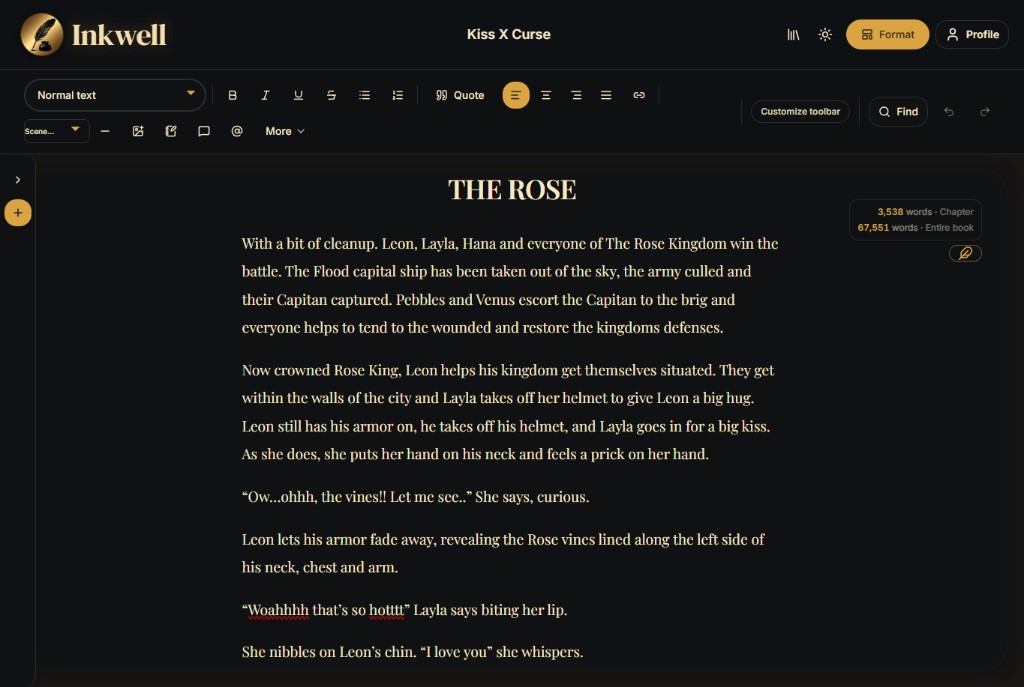
Inkwell writing workspace — chapter list, manuscript canvas, and editorial toolbars

Free local-first writing software for novels. Draft chapter by chapter, keep the manuscript on your device, and export EPUB, print-ready PDF, DOCX, or Markdown whenever you are ready — no account, no subscription.

  • Chapter-first editor shaped like a manuscript, not a folder of files
  • Unlocked exports: EPUB, print-ready PDF, DOCX, Markdown, and plain text
  • Local-only by design — no cloud sync, no signup wall, no upsell
Start writing in Inkwell

What it is

Free local-first writing software for novels.

Inkwell is a manuscript-shaped editor. You write chapters, not files. You see your book as a spine of chapters — with notes, drafts, and research hanging off it — instead of as a tangle of documents you have to keep track of in your head.

Why it is free

No account. No subscription. No export paywall.

We removed cloud sync and billing from the product so the core job stays clear: finish the manuscript. EPUB, print-ready PDF, DOCX, Markdown, and plain text exports are unlocked. Your library stays on your device.

Who it is for

Anyone trying to finish a manuscript.

New authors who need a runway, working novelists who want a calm chapter spine, and self-publishers who care about the printed book at the end. If a chapter is the unit of your work, Inkwell will fit your hand.


Built like a book — owned like a file

Most writing apps optimize for accounts, sync, and upgrades. Inkwell optimizes for the next chapter. Start in the browser, keep working offline-friendly, and export when the draft earns a trip to KDP or another retailer. Prefer a desktop install? Use the Windows build from GitHub Releases.

Read the studio note: Inkwell is free and local-first .


FAQ

Inkwell questions

Is Inkwell really free?
Yes. Inkwell is free writing software with no subscription. You can draft and export without creating an account or paying to unlock formats.
Does Inkwell sync to the cloud?
No. Inkwell is local-first. Manuscripts stay in the browser or Windows desktop app. Use portable .inkwell.zip backups when you want a file you control.
What can I export from Inkwell?
Inkwell exports EPUB, print-ready PDF, DOCX, Markdown, and plain text — unlocked for free.

Ready when you are.

Inkwell runs in your browser, works without an account, and never asks you to pay before you can export the book you wrote.

Open Inkwell